Service is busy. A walk-in shows up, a four-top wants to move to the window, two parties need to swap. Until now, every one of those changes meant opening a reservation, hunting through the details screen, and tapping through the availability picker. Not any more.
One-tap actions from the reservation menu
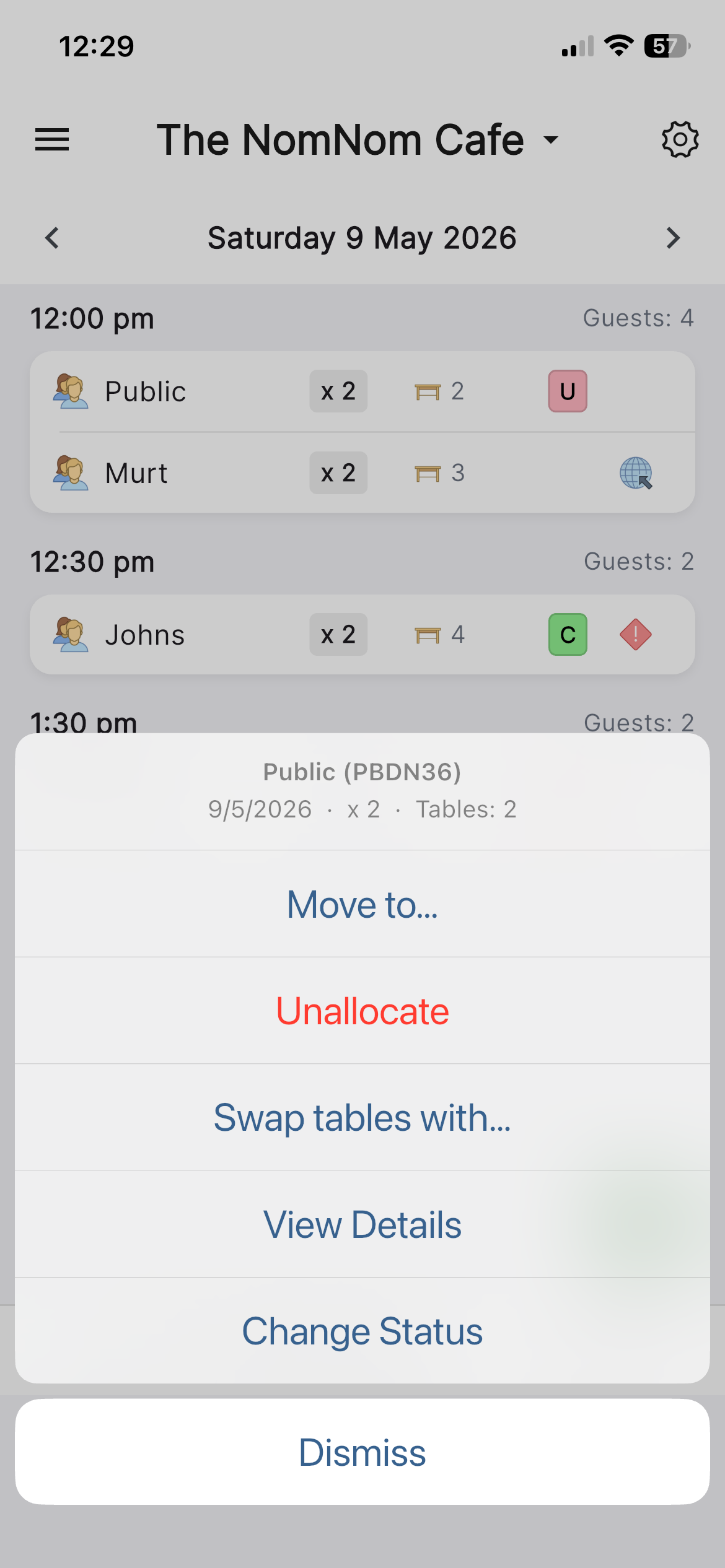
Tap any reservation — either in the list or on the planner chart — and the action menu now leads with the three things you actually want to do mid-service:
- Move to… — pick a new table from a single sheet, no wizard.
- Unallocate — clear the table assignment but keep the booking, ready to re-seat later.
- Swap tables with… — pick another reservation on the same day and exchange their tables in one go.
The familiar View Details and Change Status options are still there — they've just moved down the list.
Swipe shortcuts on the reservation list
If you don't even want to open the menu, the main list now supports horizontal swipes:
- Swipe right — opens the quick Move to… picker.
- Swipe left — unallocates the reservation (the booking stays in the list, just without a table).
Every action gives a quick haptic tap and a snackbar with an UNDO button, so a wrong swipe is never more than one press away from being put back.
Where this helps
The big win is during service, when the planner is already on screen and you don't want to lose your place. Swipe to unallocate a no-show, or swap two parties whose tables got mixed up at booking time — all without leaving the list or the chart.
It's a small change with a big impact on the rhythm of a busy night. Give it a try on your next service.