For a wine tasting, a wreath-making workshop or a party night, the price is usually the price of the event itself, not a deposit that comes off the bill later. Set the event to charge a ticket price and guests pay for their tickets by card when they book, and every screen, email and receipt calls it a ticket rather than a deposit.
Before you start
Guests can only pay online once card payments are set up for your venue. If they aren’t yet, see Connecting card payments with Stripe. You’ll also need the event itself (see Setting up events and sharing their booking link).
Setting the ticket price
1. Open the event. In NomNom Web, click Configuration, choose Events, click the event and choose Edit Event. For a new event, click Add event.
2. Open the Payment tab and, under When guests book, choose Pay now.
3. Set who pays. Leave Charge from at 1+ guests so every booking buys tickets.
4. Set the price. Choose Per person and type the price of one ticket in Deposit amount, such as 35.00. The box keeps that name even for tickets. Choose Flat fee instead if one price covers the whole booking, such as a table for a quiz team.
5. Give children their own price, if you like. Type it in Child price: 15.00, say, or 0 if children go free. Leave it blank and children pay the same as adults. (See Prices for children below.)
6. Switch on Charge as a ticket price and click Save changes (Create event for a new one).
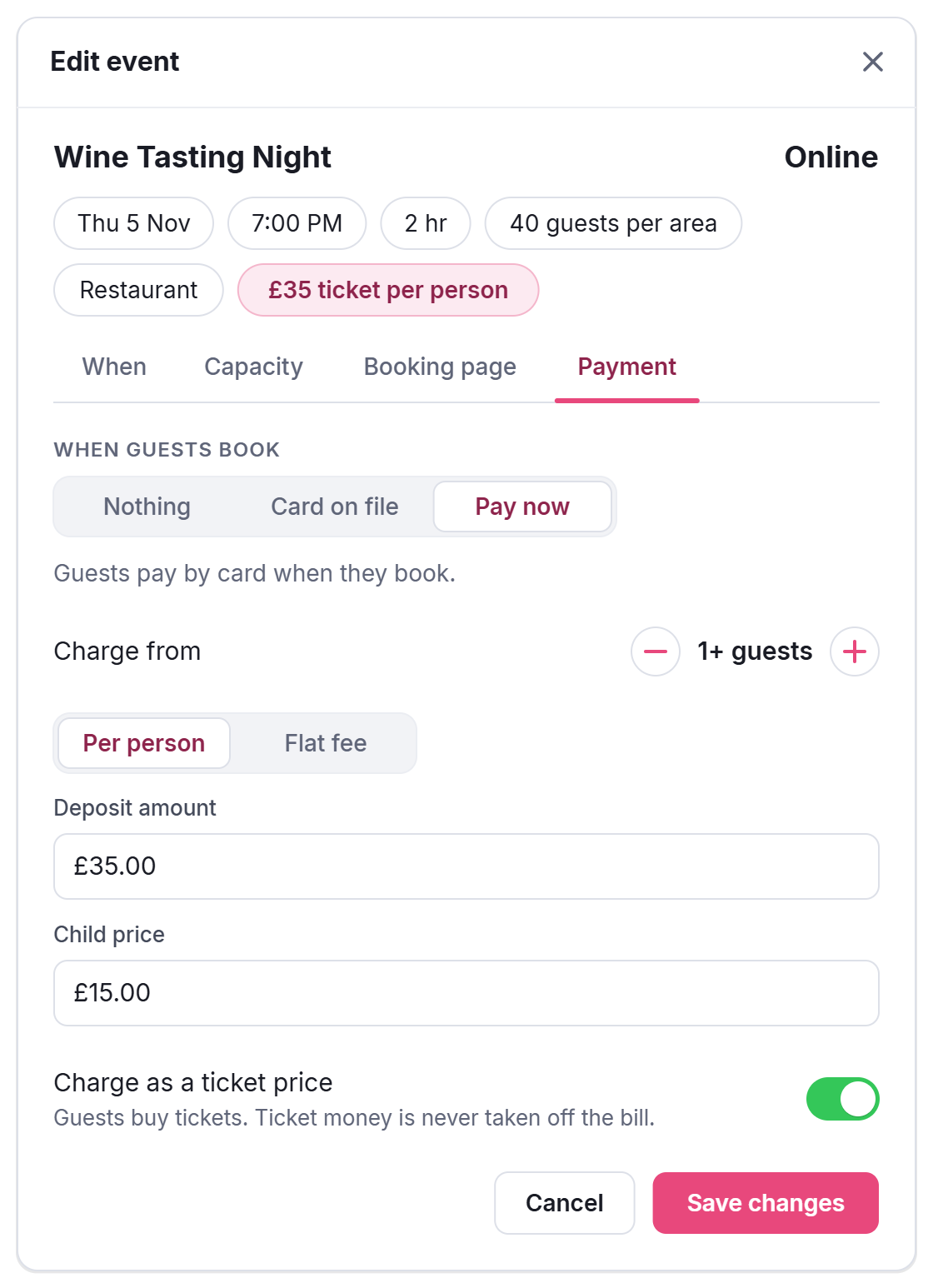
The summary along the top of the event window then reads, for example, £35 ticket per person, so you can check the price at a glance whichever tab you’re on.
Prices for children
A child price only applies when your booking page asks guests how many children are coming. If it doesn’t yet, open Settings → Online Booking & Discover and switch on Children selection under Booking options. Without it, every guest pays the adult price.
- Blank — children pay the adult price.
- 0 — children go free; only the adults are charged.
- An amount — each child pays that, each adult pays the ticket price.
A child price works with Per person only: a flat fee is the same whoever comes.
What guests see when they book
Guests book as usual: the number coming, a time, then their details. The payment step is called Tickets instead of Deposit. It shows the price per ticket, how the total is made up and the total itself, such as 2 adults × GBP 35.00, 1 child × GBP 15.00 and Ticket price: GBP 85.00. Underneath, it says the payment is for their tickets and isn’t taken off their bill on the night. They enter their card and the booking is confirmed once the payment goes through.
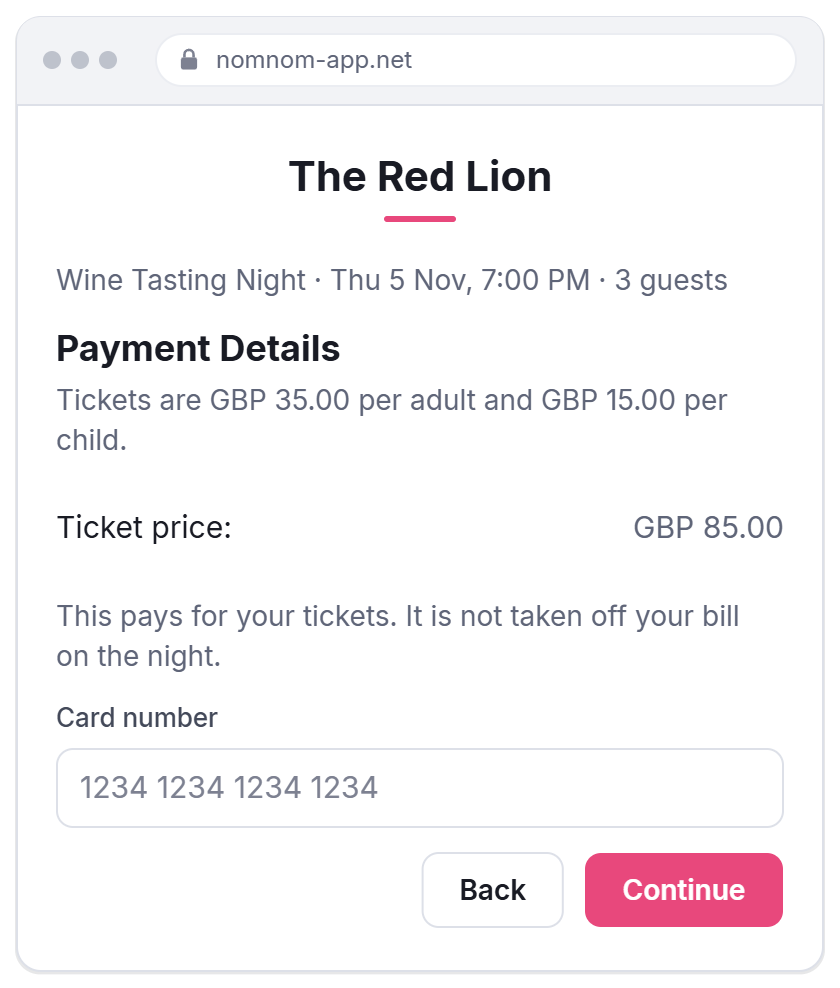
Put the price in the event’s Public notice too (on the Booking page tab), so guests see it before they start booking: it shows on the event’s own page and under the event on your booking page.
After they book
- The confirmation email shows Tickets Paid with the amount, and leaves out the usual line about a deposit coming off the bill.
- The booking shows the payment on its Card & Payments tab, like any card payment (see Reading a booking’s Card & Payments tab).
- In Stripe, the payment is described as Tickets: and the event’s name, so ticket sales are easy to tell apart from deposits.
Refunds and cancellations
A ticket is refunded like any card payment: open the booking, go to Card & Payments, click the payment and choose how much to give back. See Refunding a deposit or card payment. Say in your Public notice whether tickets can be refunded, so guests know before they pay.
Good to know
- The money is handled exactly like a deposit. Charging as a ticket price only changes the words guests and your team see; the payment, the fees and the payouts are the same (see What NomNom and Stripe charge on deposits, vouchers and SMS).
- There are no separate tickets to print or scan. The guest’s confirmation email is their proof of booking.
- Bookings your team takes aren’t charged automatically. To take payment for a phone booking, send the guest a payment link from the booking.
- Every date with the same name shares the price. Change it on one date and it changes on all of them.
- Switch Charge as a ticket price off and the same amount becomes an ordinary deposit, taken off the bill on the night.
In NomNom Web: Configuration → Events → click the event → Edit Event → Payment. In the phone app, the same settings are in the event’s card and deposit section.