Some people work for more than one company on NomNom: a consultant, a group operations manager, or someone helping several restaurants. They don’t need a second account. Each company can invite them by email, and their one sign-in then opens all of them.
How it works
- Their account belongs to one home company: the company that first gave them a sign-in. Their name, email and password are looked after there.
- Every other company that invites them chooses their role for that company. It applies at all of that company’s venues they’re invited to, and doesn’t change what they can do anywhere else.
- When they sign in to NomNom Web, their venues are grouped by company, so they can switch between them.
To join another company, they open that company’s invitation and enter their current password (see Inviting someone by email).
For the company that invited them
People from other companies appear under Members from other companies on the Team tab of People & Access, with the company they’re from and the venues they can use.
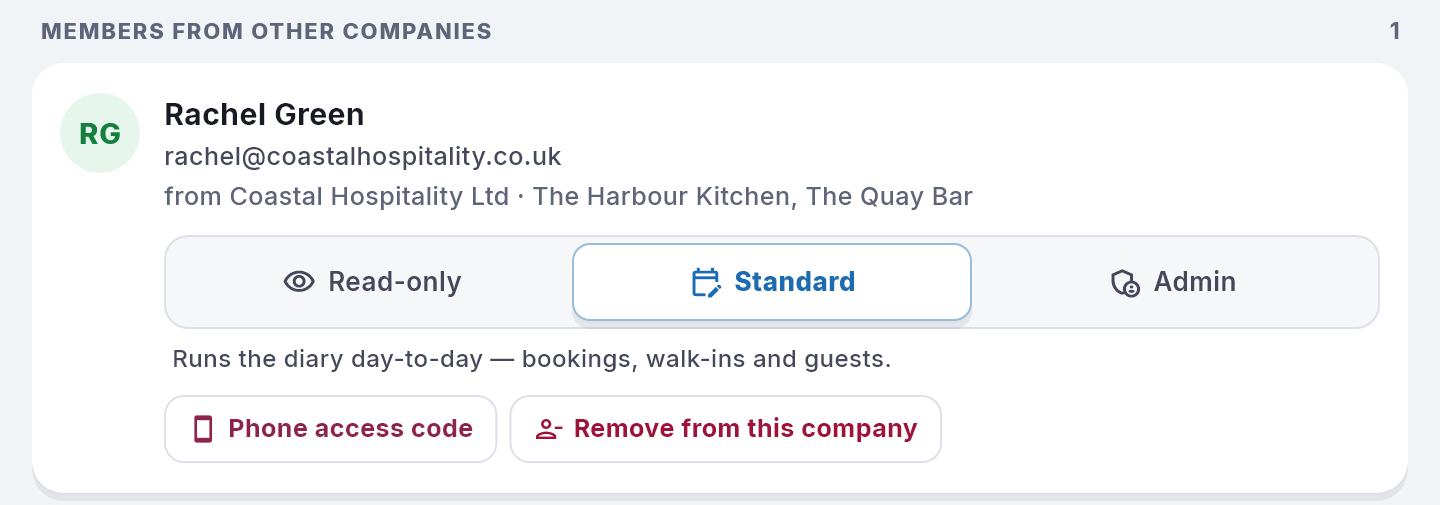
- Change their role for your company by clicking Read-only, Standard or Admin.
- Phone access code gives them a code to sign a phone in at one of your venues.
- Remove from this company takes away their access to your venues and signs them out of them straight away. They keep their own account, and their own company’s venues are not affected.
Their name, email and password belong to their home company, so only that company can change them.
Good to know
- Only a company admin sees Members from other companies.
- An admin of one venue can invite someone from another company as Standard or Read-only. To make them an admin, ask a company admin.