Sometimes a guest ends up booked twice for the same evening: you book them in over the phone, and later they book again on your website. NomNom spots this and marks both bookings as a Possible duplicate, so you can check before you hold two tables for one party.
When it appears
Two bookings are marked when they are:
- on the same date,
- starting within 3 hours of each other, and
- share the same email address (capital letters and spaces are ignored) or the same mobile number (NomNom compares the last 9 digits, so 07700 900123 and +44 7700 900123 match).
Cancelled bookings never count. Lunch and dinner for the same guest, or the same guest on different nights, are not marked, because they are more than 3 hours apart or on different dates.
Where you see it
- Your bookings list. An amber copy icon beside the name, in NomNom Web and on the phone app’s booking cards. In NomNom Web, hover over it to see which booking it matches, for example “Same email or phone as: Sarah Jones 19:00”.
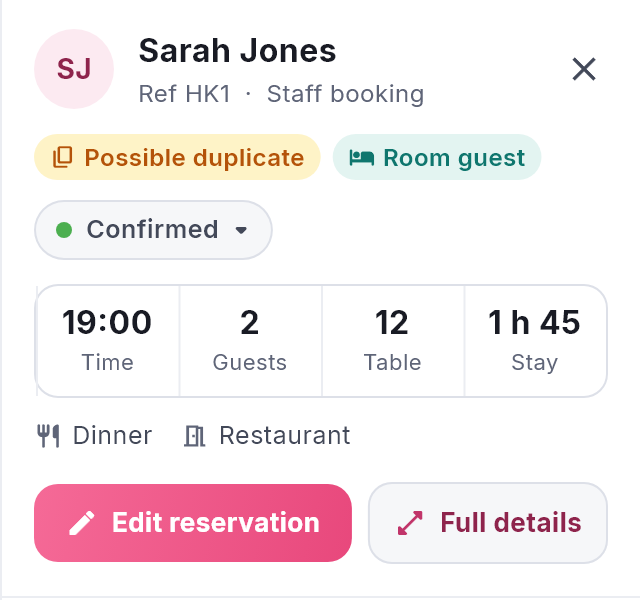
- The booking itself. An amber Possible duplicate label in the panel beside your bookings and in Full details. Hover over the label to see the matching booking.

What to do
- Look at both bookings. Check the names, party sizes, times and notes.
- If they are the same visit, keep the one you want and cancel the other. Copy across anything useful first, such as notes or allergies from the online booking. See Cancelling a booking and marking a no-show.
- If they really are two bookings (for example, the same person booked a table for a friend), leave them both. Nothing is blocked.
Once one of the two is cancelled, the amber marks disappear from the other.
Good to know
- It is only a warning. NomNom never stops either booking or cancels anything for you.
- It compares what is on your screen. If you are looking at one area or one meal, only the bookings in that view are compared. Choose all areas and all meals to be sure.
- Bookings with no email or mobile cannot be matched.
- Your guests never see it.