New Year's Eve, a band night, a quiz, a summer party in the garden. You put on an event, the bookings roll in, and on the night the kitchen asks the question nobody can answer: how many of these people are actually eating? Some tables want the full menu, some are only there for the bar and the music, and plenty are a bit of both. Ring round a hundred guests to find out and you lose an afternoon. Guess, and you end up with either a fridge of spare food or a kitchen that runs out at nine.
NomNom events can now ask that question for you, when the guest books. It is included in the plan, and it is off until you switch it on for an event.
What the guest sees
The guest books the event as usual. On the Your Details step they get one extra question: Will your party be eating?, with two answers to tick.
- Food. The whole party is eating.
- Drinks only. Nobody in the party is eating.
- Both. A mixed table ticks both, and the page then asks How many of your party will be eating? A party of eight can say five are eating and three are only drinking.
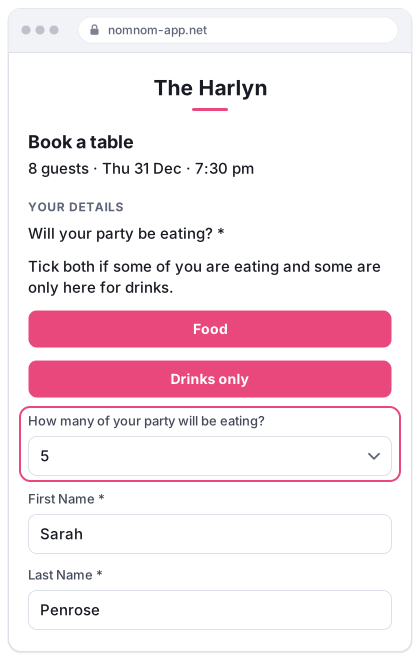
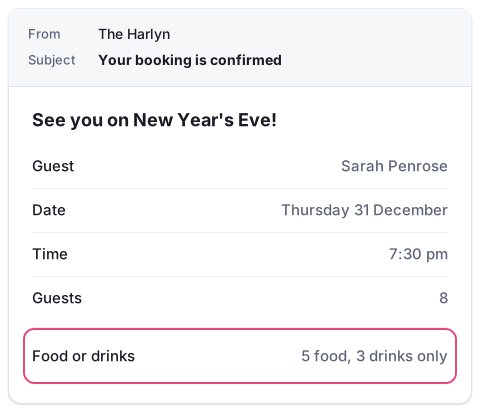
The question has to be answered before the guest can move on, so you are not left with gaps. The answer is shown in their confirmation email, in a Food or drinks row, so they can see what they told you.
The question only appears for an event you have switched it on for. Your regular meals and every other event book exactly as they do today.
What your team sees
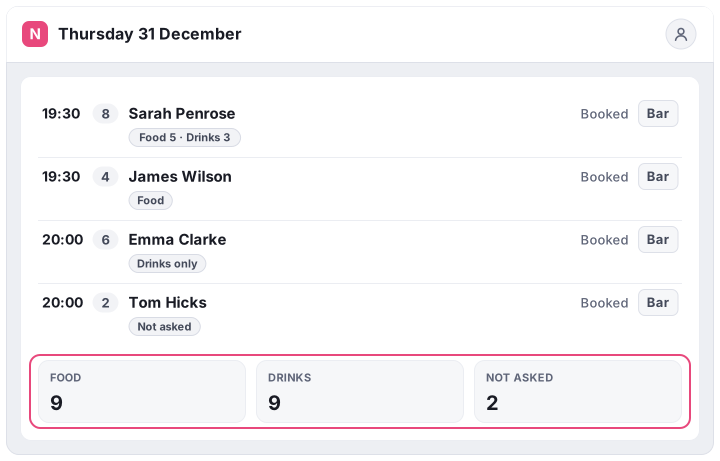
- On every booking. A small label on the booking says Food, Drinks only, or the split for a mixed table, such as Food 5 · Drinks 3. It shows in the bookings list, on the table chart and on the booking itself.
- Totals for the night. The footer of the bookings screen gains Food, Drinks and Not asked totals for that event, counted in guests rather than bookings. That is the number the kitchen needs for ordering and prep.
- Not asked. A booking made before you switched the question on, or taken over the phone, shows as Not asked. Click the Not asked total to open the next one. Staff can fill the answer in on any booking, so a phone booking can be asked at the same time as the name and number.
- On the service sheet. The printed service sheet shows each booking's answer, and the food and drinks totals sit in its header, ready for the kitchen wall.
Why ask at all?
Because on a party night the number that matters is not covers, it is meals. A hundred guests could mean a hundred dinners or forty. Once you know the split you can:
- Order and prep to the real number, rather than the headcount, and cut what goes in the bin.
- Staff the kitchen and the bar for the night you will actually have. A drinks-heavy evening needs hands behind the bar, not on the pass.
- Lay the room properly. Diners get laid tables, and drinkers can be given the high tables or the space by the bar.
- Spot a problem early. If a week out only a handful are eating, you can push the menu while there is still time.
What it doesn't do
It is a question, not a price list. The answer does not change the price, the deposit or the number of places the event has left: a drinks-only guest takes a place and pays any deposit just like a diner. If you charge differently for food and drink, say so in the event's public notice.
Switching it on
- Open the event. In NomNom Web, click Configuration at the bottom of the left-hand panel (admins only), choose Events and open your event.
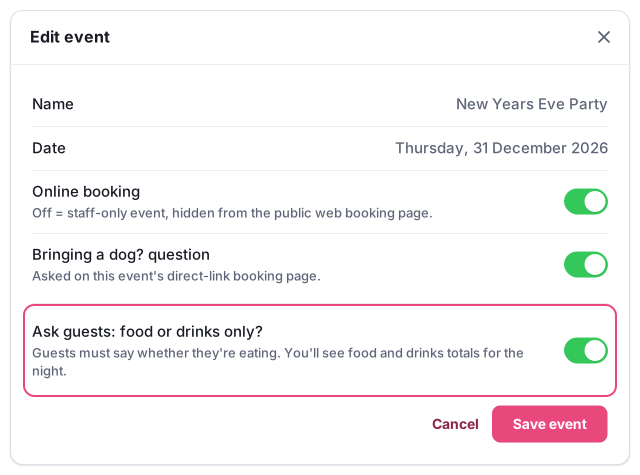
- Turn on “Ask guests: food or drinks only?”, under Online booking and the Bringing a dog? question, and save. It covers every area the event runs in, and a duplicated event copies it.
- Fill in the gaps. If the event already has bookings, they show as Not asked. Fill in the ones you know, or ask the rest when you confirm with them.
The help centre has the full guide to setting up events and sharing their booking link.
Not on NomNom yet? Start your free 14-day trial. There is no setup fee and no contract. Or get in touch if you would like to talk your party nights through with us.